

The market-leading image and photo editor
Adobe Photoshop CC is the image editing software market reference, becoming an essential tool for professionals and enthusiasts in the world of digital photography. Developed by Adobe and integrated within the Creative Cloud suite, Photoshop is a powerful tool to enhance, edit, and manipulate any image with amazing results. Despite having a quite steep learning curve, Photoshop is presented as the industry standard compared to alternatives such as GIMP, Krita, CorelDraw, or the more recent Procreate. Would you like to know why?
What is Adobe Photoshop and what is it used for?
Photoshop is a well-known image and photo editing program developed by Adobe. It is used in a wide variety of fields, becoming the standard software for graphic design, photo editing, and digital illustration. Known as the industry's reference program, Photoshop is the most downloaded and used program when it comes to creating digital content. Its main functions include:
- Image editing, correction, and retouching- Photoshop CC allows for all kinds of basic edits (cropping, color adjustments, brightness, etc.) as well as correcting and retouching images (improving photos, smoothing skin, removing imperfections, etc.)
- Manipulation of photographs- As a digital composition tool, Photoshop allows for transforming and modifying elements of a photograph, adding all kinds of unique effects.
- Creation of graphics and effects- Photoshop is the leading program for creating digital content, becoming the most used tool among professional graphic designers.
- Drawing and illustration- The program includes all the necessary tools and brushes (in addition to being able to create your own) to shape any type of digital illustration from scratch.
- Web design- In addition to creating and retouching images, Adobe's software is also an essential tool for web designers. From it, it is possible to create designs, interfaces, and applications for any type of webpage in a matter of seconds.
Interface: A smooth and carefully organized experience
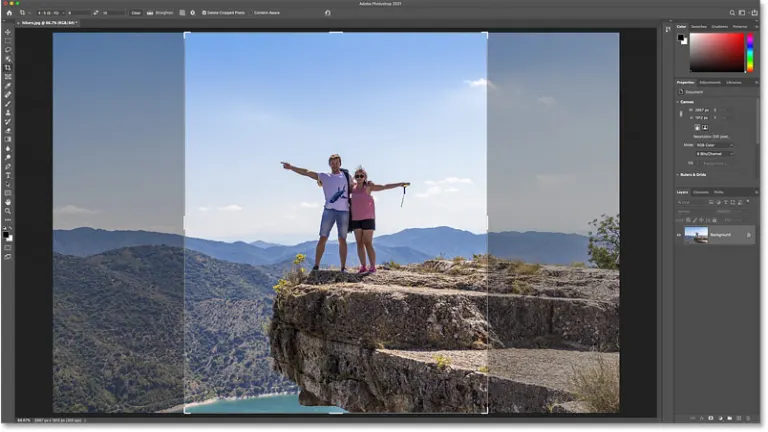
Despite having evolved over the years, the interface of Adobe Photoshop CC remains true to its structure, being easily accessible for those familiar with previous versions of the program. It is clear and intuitive, divided into a central workspace window, a toolbar on the left side of the screen, an options window at the top, and a small section showing layers and masks on the right side of the screen.
How can I download Adobe Photoshop for free?
Adobe Photoshop CC is a paid program, and to enjoy it, you will need to make use of a monthly or annual subscription to the Creative Cloud service. Despite this, there are different legal methods through which you can download Photoshop for free:
- Make use of the free trial period- Adobe offers a 7-day trial period during which you can use Creative Cloud completely for free.
- Follow Adobe on social media- Often, Adobe offers discounts and special promotions through social media. Follow them to stay informed about significant changes in the price of Adobe CC.
- Get a student or educator account- Although not free, you can get Photoshop CC at a greatly reduced price if you are a student or part of an educational institution.
- Opt for a free alternative- Despite Photoshop being considered the standard software for digital editing, there are free alternatives like GIMP or Krita that offer a similar experience to Adobe's software.
How to get started with Photoshop
Photoshop is a journey, not a destination.
Getting started with Photoshop can be an exciting and rewarding experience, allowing you to explore your creativity and produce visually stunning images.Upon launching Photoshop, you'll be greeted with the main workspace. Take some time to familiarize yourself with the layout, including the menu bar, toolbars, panels, and workspace options. This will help you locate the tools and features you need easily.
Understanding the layers
Layers are the foundation of Photoshop editing. Each layer represents a separate element in your image, allowing you to manipulate and modify them independently without affecting the underlying layers. Experiment with creating, editing, and merging layers to grasp this essential concept.
Learn the basic tools
Photoshop offers a wide range of tools for various editing tasks. Start by exploring the essential tools, such as the Selection tools, Move tool, Marquee tools, Lasso tools, Magic Wand tool, Eraser tools, and Brush tools. Practice using these tools to make selections, move elements, and apply adjustments.
Get to know adjustment layers
Adjustment layers are powerful tools that allow you to non-destructively modify an image's overall appearance without altering the original pixels. Explore adjustment layers like Levels, Curves, Hue/Saturation, Brightness/Contrast, and Vibrance to enhance your images.
With the basics under your belt, start practicing editing techniques like cropping, resizing, rotating, flipping, and straightening images. Experiment with applying filters, adjusting colors, and enhancing details to refine your editing skills.
If you ever feel stuck, there's a wealth of online resources available to guide your learning. Take advantage of tutorials, video demonstrations, and practice exercises to deepen your understanding of Photoshop's features and techniques.
The following guides and tutorials from Adobe is a great way to get started with your Photoshop journey:
- Get to know the app
- Get to know selections
- Get to know layers
- Get to know layer masks
- Get to know adjustment layers
- Add text and shapes
- Apply filters
- Use color
- Combine images
- Change the image size
- Adjust the image quality
- Retouch images
The key to mastering Photoshop is consistent practice. Set aside time regularly to work on projects, experiment with different techniques, and challenge yourself with new ideas. The more you practice, the more confident and skilled you'll become.Photoshop is a vast and versatile tool, so don't hesitate to experiment with different features and techniques. Embrace the creative process, explore new possibilities, and don't be afraid to make mistakes.
And lastly, surround yourself with inspiring artwork and photography to spark your creativity and fuel your passion for image editing. Draw inspiration from various sources, both traditional and digital, to expand your artistic horizons.
An indispensable tool for image editing
Adobe Photoshop CC is the standard software in the world of digital editing. Its intuitive interface and wide range of advanced tools and features have made it the favorite software of industry professionals. Despite having a steep learning curve and requiring a Creative Cloud subscription, its results are still the best in the industry today. Therefore, it is a must-have download for any creative professional looking to make a name for themselves in the world of photography and digital illustration.

























User reviews about Adobe Photoshop CC
by ROCKY GAMER
by Aditya
BIU$
by saryan
Thanks you,the best softwere
by Mr Okay7 Official Channel
it is very good application when it comes to photo editing and other designs
by HALO Gaming
how download world war z thank youmy name is halo jabar how download world war z thank you
by Majedah Rashid
it rocks. its the best. i love it. cannot imagine life without it